For app makers · UX feedback
UX feedback on screens and flows
Get UX feedback on one screen before changing the whole flow. An onboarding screenshot can also reveal where people hesitate. Quick user testing here means a first reaction to a screenshot, not someone clicking through a prototype. We aim for first answers within about 15 minutes in UK daytime; the pool is small for now, so replies can take longer.
We review requests by hand.

Questions for UX feedback
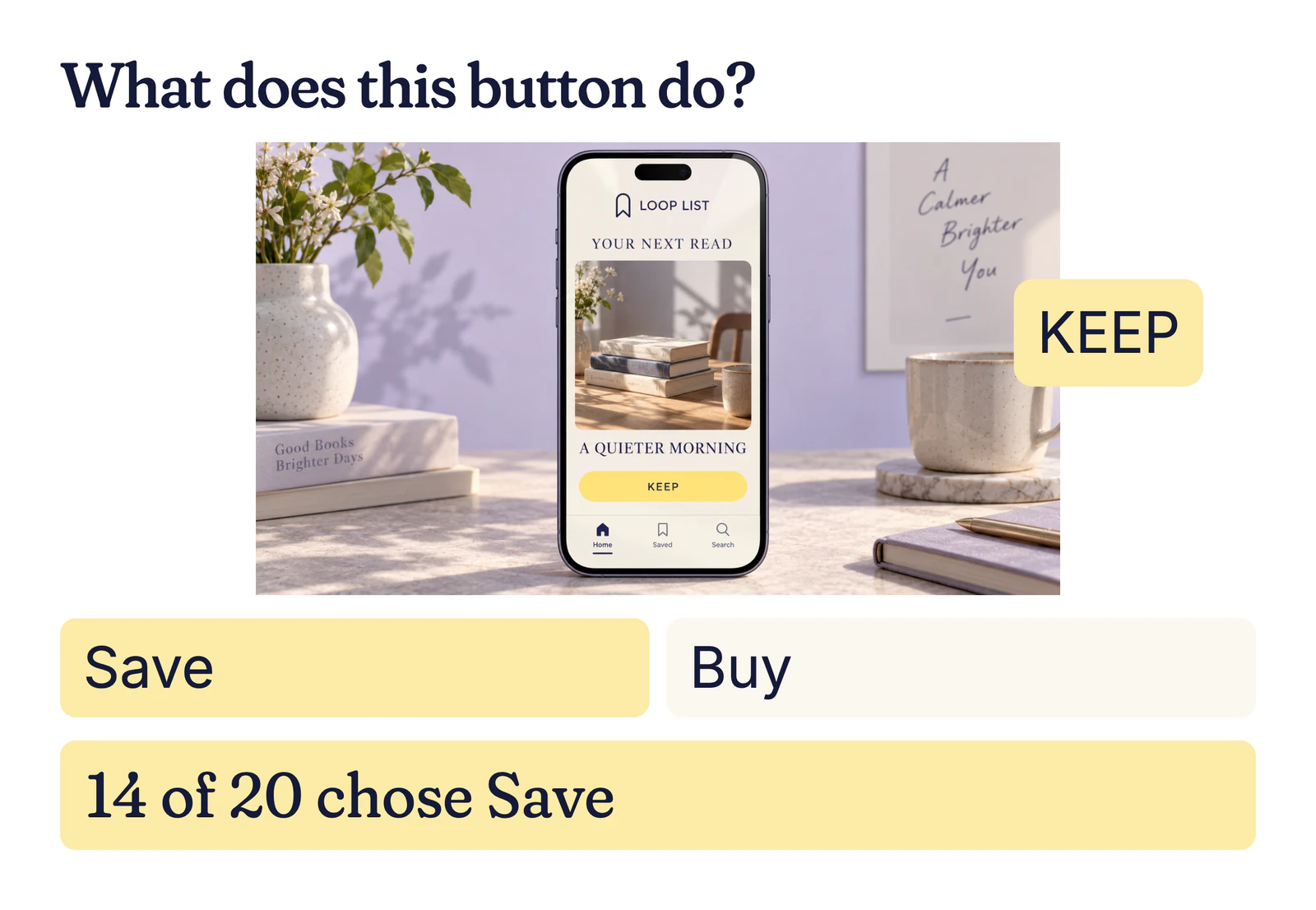
A screenshot can expose a confusing label before you change the full onboarding flow. Ask what the next step appears to mean:
- Example: LoopList asks what its “KEEP” button does: Save or Buy?
- Which of these two onboarding screens looks easier to start with?
- How clear is this next step, from 1 to 5?
What the UI feedback shows
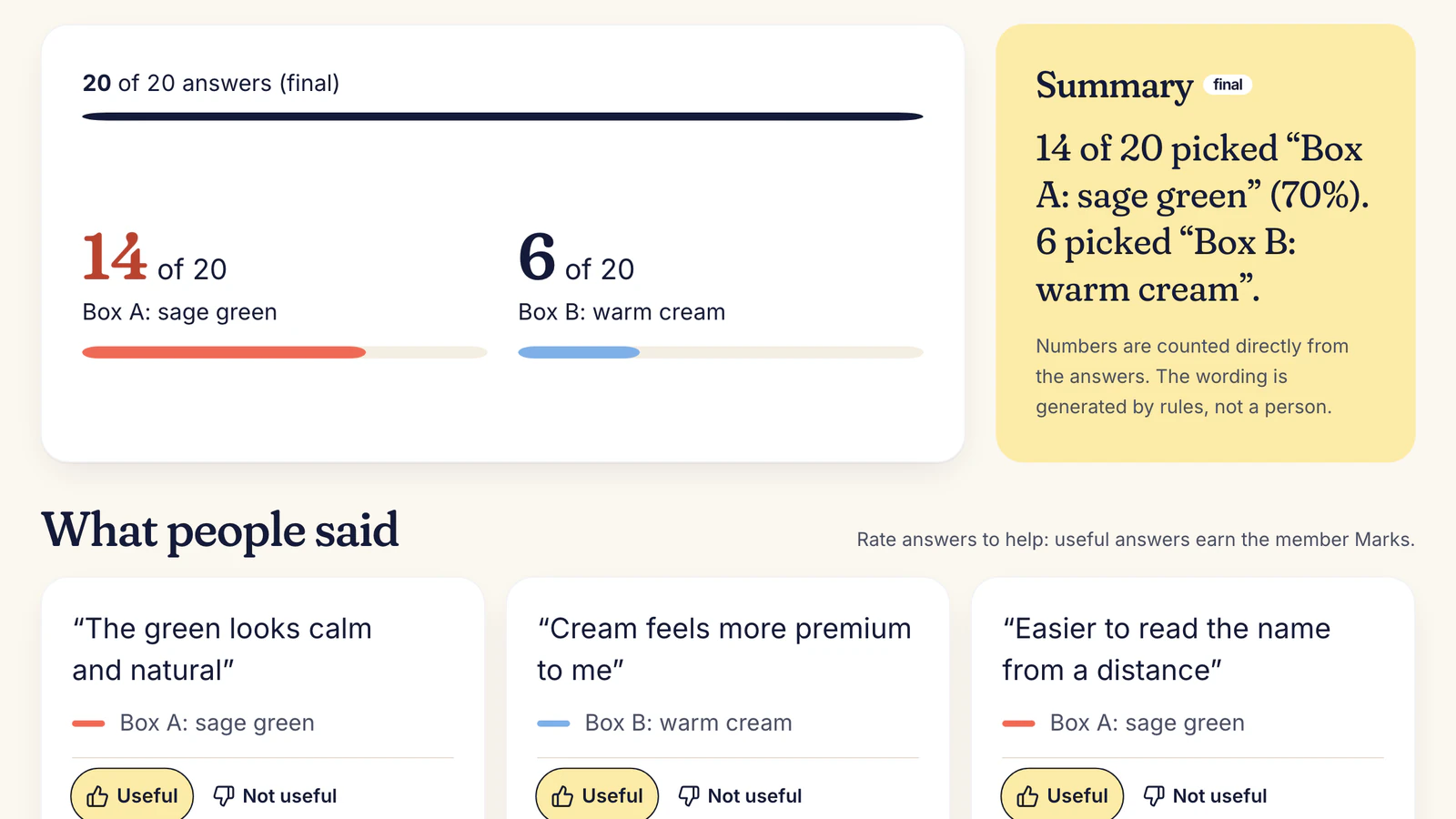
Illustrative result: Example: 14 of 20 read “KEEP” as Save; six read it as Buy. Their reasons point to a practical risk: a button that feels like a purchase can stop someone continuing. Change the label to “Save”, then test whether that removes the ambiguity. A 14-to-six split is a prompt to investigate, not evidence of a measured drop-off.
How to ask for onboarding feedback
Export one screen per question. For onboarding feedback, test each important screen separately and keep the prompt constant where you can. Verified UK adults answer without knowing the intended behaviour or seeing other replies. You get their picks, one-line reasons and a short summary.
The Ask hub covers other formats.
What quick user testing can and cannot show
UI feedback from someone outside the team catches words that only make sense to the people who designed them. Ask what a button appears to do before asking whether a person likes its colour. The expectation tells you what to change.
Honest limit: This is not a clickable Figma prototype test. Members cannot tap through the flow, and recordings or heatmaps are not available. You cannot target an exact user segment yet, so check important changes with your own users as well.

What it costs
Asking is free during early access, by invitation. At paid launch a quick take starts from 30p an answer plus 50p a question (launch example); 20 quick takes would come to about £6.50. You see the quote before asking.

Your questions, answered
How do I get UX feedback quickly?
Show one screen and ask what a person expects to happen next. Give concrete choices when you need a comparable split, then read every reason. A vague request for “general feedback” is harder to turn into a design change.
Can I test a Figma prototype?
You can export a screenshot from a prototype and test that image. Members cannot click through a live prototype in the current quick-take format. For interaction problems, use a dedicated usability session or your own product analytics.
What is quick user testing good for?
It can expose a confusing label, misleading button or screen that fails to explain its purpose. It cannot show whether a person can complete an entire task. LoopList’s “KEEP” example reveals a possible interpretation problem, which the team can address and retest.
How do I test onboarding?
Start with the moment a new person has to choose an action. Show that screen alone and ask what they would do next. For a longer sequence, ask separate questions about each step; do not claim that static screenshots prove a complete onboarding journey works.
Is this a usability test?
It is a narrow first-reaction check. Members see an image and answer one question; they do not use a live app or complete a recorded task. That distinction matters when deciding whether the result is enough for a release decision.
How much does this test cost?
During invitation-only early access, asking is free. At paid launch, the example rate is 30p per answer plus 50p per question, so 20 answers would be about £6.50. You see the quote before posting. This buys a response to a screenshot, not a recorded click-through or a test of an entire flow.
Find out what people really think.
Free during early access. No card needed.
Free during early access. We review requests by hand. Have an invite code? Join